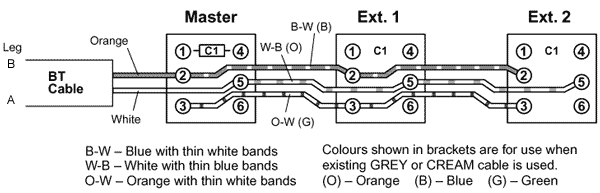
B - W = Blue with thin white bands
W - B = White with thin blue bands
O - W = Orange with thin white bands
Colours shown in brackets are for use when
existing GREY or Cream cable is used.
(O) - Orange (B) - Blue (G) - Green
Although pin 4 has no
function in a domestic installation it is usually connected for the sake of neatness. The quality of wiring carried out by many older BT
wiremen is often approaching art in its perfection.
The BT Drop Cable (The cable coming from the outside world)
This often has Orange, White, Green and Black
wires. Usually (but not always) Orange and White are the active
pair and go to connections 2 and 5 in the master socket. In some
master boxes (such as the type with a removable front section) they go
to two connectors marked B and A.
Which way round they are connected usually
doesn't matter but some modems (especially
older USA sourced ones) and some answering machines are fussy
about polarity, so it's wise if possible to
check the voltage on the line and connect -48V to the Aleg(5) and 0V to the Bleg(2)in the
master socket.
If you have
underground wiring with a small grey connection box by the door the
internal cabling will usually be the same type and colour as the
extension cabling.
Internal
Cabling
Conn
No.
Usual
Cable Colour
Carries
1
N/A
No connection
2
Blue with
White Bands
Speech and
Ringing
3
Orange with
White Bands
Ringing
4
White with
Orange Bands
Not used but
usually connected for neatness
5
White with
Blue Bands
Speech and
Ringing
6
N/A
No connection
An Important
Note on Colour Codes
The colour code shown above is the one
which would normally be used by BT. HOWEVER
it isn't always adhered to, especially if internal wiring in a new
house has been installed or modified by previous occupants.
You should
never rely solely upon the colour code - always check both ends of the
cable.
Fault Finding
No
ringing - Terminal 3 disconnected
Phone ringing continuously.- Terminals 2 and
5 swapped (2 at one socket connected to 5 on another and vice versa)
Very poor speech quality, possibly poor
bell. - Terminal 3 and 2 or 3 and 5 transposed
Ringing but no speech (or very poor
speech) and can't dial out. - Wire between terminals 2 or 5
broken.
Testing the cabling
You have an installation where the main socket
works and the remote in the garage roof doesn't. You need to test
the continuity of the circuit. So you
can use a very long lead with and a test meter - or cheat.
Firstly,
disconnect the BT line completely.
In
the remote end bridge any two terminals (make a note of which
two).
Measure
continuity between these two wires at the master socket end -
should be no more than a few ohms.
Repeat
for the second pair of wires.
If
either show a fault swap the combinations - so if you tried 2 and
4 and that was OK, and then 3 and 5 and that failed, you know 2 and
4 are both good so trying 2 and 5 and 2 (or 4) and 3 will show you
the faulty wire.
HELP!!
OK - so you have tested the cables and there is 150 yds of cable buried in the newly decorated
wall and only 2 wires have continuity - what do I do??
This is about the only occasion where you
cheat and use a second master socket.
The second master gives you back your ring
signal so connect the two working wires to terminals 2 and 5 on the new
master and hope for the best!
Ringer Equivalence Number (REN)
REN
measures the load a device places on the line when ringing. A
normal BT line will support a REN of at least 4, in other words
at least a total of 4 phones/fax/modems should work on any line so long
as their REN figures added together don't exceed 4.
The
REN is normally found on a label at the base of the machine
(near the green approval symbol).
In
practice you can quite often exceed this number because devices with a
REN of 1 may actually have a real REN of only a fraction of 1.This is an anomaly of the test procedure
used. Moreover many lines can drive a
REN of more than 4.
Note that some elderly fax and answering machines can have very high
REN's (and they really are high!). If some or all
of your phones fail to ring or some ring very anaemically then its possible you have exceeded the REN. Try
unplugging devices until they work.
You can get REN Boosters which will increase the ringing capacity of a
line if desired, although if you get to this stage you should probably
be thinking of installing a small PABX.