Socket / Plug Wiring Guide
Standard Plug/Jack and Socket Wiring - 100BaseTX
There are three wiring options, called T568A, T568B, and USOC. T568A is supposedly "preferred" (though I've heard that T568B may be more common).
Plug / Jack - RJ45 - 568B
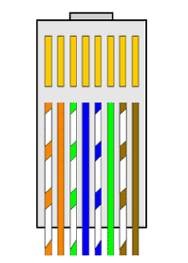
If you're looking at the contact end of a plug with the latch down, pin 1 is on the right.
If you're looking at the wiring end of a plug with the latch down, pin 1 is on the left.
Plug / Jack - RJ45 - 568A
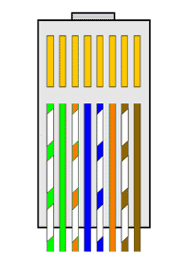
If you're looking at the contact end of a plug with the latch down, pin 1 is on the right.
If you're looking at the wiring end of a plug with the latch down, pin 1 is on the left.
Sockets / Wall Plates
- Pin layout varies from make to make
- Use the pin numbers or colour codes provided.
- Ensure you keep to 568B or 568A.
Wiring Colors and Signals
The transmit data (TX) and receive data (RX) signals on each pair of a 100BaseTX segment are polarized, with one wire of each signal pair carrying the positive (+) signal, and the other carrying the negative (-) signal. Colors may vary by manufacturer. This is just an example of what you might see.
| 258B RJ45 pins |
Color | Signal | 258A RJ45 pins |
Color | Signal | |
|---|---|---|---|---|---|---|
| 1 | TX+ | 1 | RX+ | |||
| 2 | orange | TX- | 2 | green | RX- | |
| 3 | RX+ | 3 | TX+ | |||
| 4 | blue | Unused | 4 | blue | Unused | |
| 5 | Unused | 5 | Unused | |||
| 6 | green | RX- | 6 | orange | TX- | |
| 7 | Unused | 7 | Unused | |||
| 8 | brown | Unused | 8 | brown | Unused |
Cat 5E Cable
Cat 5 core pair colours
| blue | / | white/blue | green | / | white/green | |||
| orange | / | white/orange | brown | / | white/brown |
CAT5 signals are "balanced": the striped and solid wires in a pair carry the same information negated, so their magnetic fields tend to cancel.
Unlike phone wires, CAT5 wires do not cross over; the same wires go to the same pin numbers at all connectors. This works because hubs all have internal crossovers.
Hub-to-hub interconnects need a special crossover cable, as does a hub-to-DSL-router connection, or a 2-node hubless network.
See patch cables for the details of making a crossover cable; if you make one, mark it so clearly that you'll never confuse it.
Q: Can I install Cat 5 cable over a distance longer than 90 meters and still certify the system as Cat5?
A: Although some cables are advertised as being tested beyond 90 meters, please be aware that the industry standards state that horizontal runs should NOT exceed the 90 meters
Installation Configuration
Star topology
Old style Ethernet bus wiring (i.e., taking the cable from one machine to the next, and then to the next, etc.) is prone to cable failure and quickly consumes allowed distances due to aesthetic wiring needs. If the wiring connection is broken at any point, the entire network (segment) fails - and the much greater number of connections increases the probability of a failure or break. On the other hand, it's pretty easy to do for a layman and may involve less actual wiring for small segments.
Star wiring eliminates the single point of failure of a common wire. A central hub has many connections that radiate out to hosts, if one of these hosts connections fails it usually doesn't affect the others. Obviously, however, the hub becomes a central point of failure itself, but studies show a quality hub is less likely to fail before a heavily used strand of coax.
Installation Notes
- Never pull / stretch CAT5 wire with more than 25 pounds of force.
- Never step on or otherwise crush, kink, or crimp the wire (don't make staples or wire ties tight).
- Never put a staple through the wire (you knew that, I'll bet).
- Avoid periodic sags; if the cable must sag, vary the intervals.
- If you bundle a group of cables together with cable ties, do not over-cinch them. It's okay to snug them together firmly; but don't tighten them so much that you deform the cables.
- Never bend CAT5 wire tightly around a corner; make sure it bends gradually, so that a whole circle would be at least 2" across. Watch especially when the wire comes out a drilled hole and turns; don't let knots or kinks happen even temporarily.
- Don't put so many wires in any conduits that it ends up more than 40% full.
- Keep cables away from devices which can introduce noise into them. Here's a short list: copy machines, electric heaters, speakers, printers, TV sets, fluorescent lights, copiers, welding machines, microwave ovens, telephones, fans, electric ovens, dryers, washing machines, and shop equipment.
- Never untwist the 2 wires in a single pair for more than 1/3-1/2" to make a connection (the twists are critical to cancel out interference between the wires).
- Try to avoid running cables parallel to power cables and never run the wire parallel to power wiring nearer than 6" away.
- No run (hub to device) may be over 90 meters long
- Do not run UTP cable outside of a building. It presents a very dangerous lightning hazard!
Click here for sales or just prices
Cat5E Cable - Plugs - Sockets -Tools - Inserts - Crimp - Patch Cables etc